Kenat App 2.0: Five Calendar Views, Ethiopian Time, and a Complete UI Overhaul
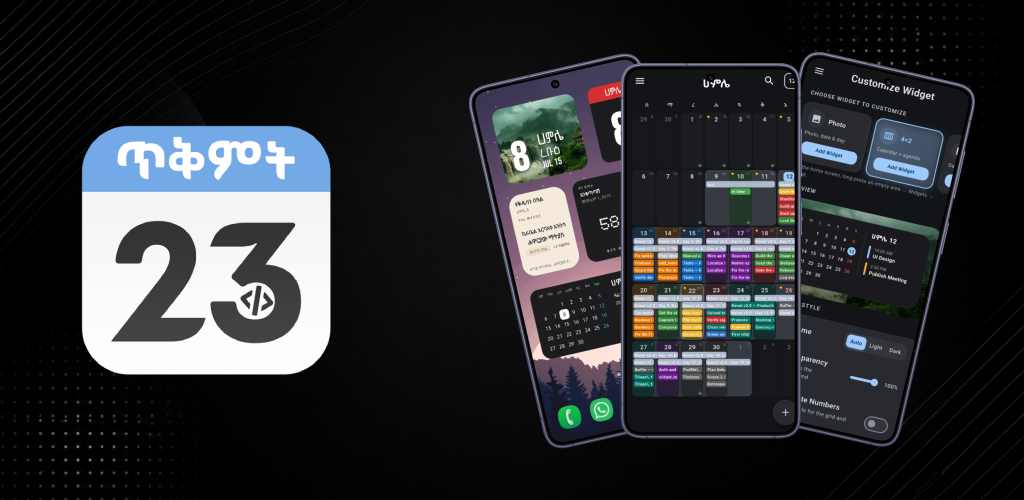
The Kenat Android app just shipped its most significant update since launch. Version 2.0 rebuilds the calendar from a single month grid into five switchable views, introduces Ethiopian time display across the whole app, overhauls every home widget, adds cloud backup and sync, and brings Material 3 to nearly every screen. It also upgrades to the kenat 2.0.0 library at its core — the same TypeScript-migrated, multi-language release covered in the previous post.
Here is what shipped.
Five Calendar Views
The biggest structural change in 2.0 is that the calendar is no longer locked to a single month grid. A view switcher in the drawer moves between Year, Month, Week, Day, and Schedule. The last-used view is remembered across restarts, and Month stays the default.
Month View
The month view is rebuilt from the ground up. Day tiles are flat and rounded, weekday headers are single-letter with Sunday accented, today gets a chip, and tapping a day selects it with an outline ring. Overflow days from the adjacent months are shown dimmed so weeks are always complete — no empty rows.
The headline feature is three snap states driven by a single pull gesture. Drag on either the grid or the event list beneath it to snap between:
- A compact week strip showing only the current week
- An exact half-grid / half-events split
- A fullscreen chips grid where the bottom navigation hides and an “Add on <date>” pill takes its place
Events and holidays now render as spanning bars that cross day cells rather than stopping at each tile boundary. Multi-day events get a merged, group-tinted background so a single event reads as one continuous band across the days it covers.
The selected-day panel at the bottom shows an Ethiopian date header and replaces the old upcoming-events sheet — no sheet chrome, no drag handle, just the events.
Year View
Thirteen Ethiopian months — including Pagume — arranged in a 3-column grid of mini-calendars. Holiday days are tinted at mini-month scale, today is highlighted, and tapping any month opens it in Month view. Swipe left or right to change the year.
Day View
A “27 Saturday” style header, all-day event cards pinned above, and a full hour timeline with a live current-time indicator. Swipe horizontally to move between days; crossing a month boundary carries the rest of the calendar with it. Tap any empty hour slot to create an event there — a ghost ”+” marker previews the slot before the add sheet opens, pre-filled with that time.
Week View
Seven-day hour timeline sharing the Day view’s gutter, current-time indicator, and tap-to-create behavior. Same swipe navigation.
Schedule View
A date-grouped agenda of the current month’s events and holidays in chronological order, with a “Today” chip anchored to the current day.
Ethiopian Time — Everywhere
A new Use Ethiopian Time setting renders event times in Ethiopian hours with proper day periods — ጠዋት (morning), ከሰዓት (afternoon), ምሽት (evening), ሌሊት (night) — across:
- Event rows in every calendar view
- Search results
- Event detail dialogs
- The hour-timeline gutter labels in Day and Week view
- The add-event sheet
- The agenda home widget
- The ongoing notification
Toggling the setting refreshes immediately with no restart required.
Across All Views
Several features apply uniformly regardless of which view is active:
- Event search in both Amharic and English, over events and holidays alike, jumping straight to a result’s date
- Multi-day events appear on every day they cover, with the full date-time range shown
- Per-event colors, picked at creation and honored everywhere in the calendar
- Landscape layout — a proper two-pane arrangement with the status bar hidden
- Redesigned day, holiday, and event detail popups, with a list/timeline toggle in the day popup
- The “Add on <date>” pill collapses to a round ”+” when the event list beneath it is scrolled, so it stops covering rows
- Month-first event loading so the initial render no longer waits on the full event range
Customization Split Into Its Own Menus
The single Style Manager drawer entry — which packed notification and widget styling into one screen behind a tab switcher — has been removed. In its place are two dedicated top-level drawer entries, each with its own screen and app bar:
- Customize Notification
- Customize Widget
Both are localized in English and Amharic and centered at a 640px max width on tablets. Widget and notification options themselves are unchanged; only where you reach them has moved.
Home Widgets Overhauled
All six widget types have been rebuilt with shared components, interactive in-app previews, and custom font support including Hibur Mono for Amharic text:
- 2×2 calendar and 4×2 agenda with presets
- Progress widget tracking the day through the Ethiopian year
- Countdown to any personal event or holiday
- Month Photo widget
- Pro: Orthodox Fasting and Saint’s Day widgets
Cloud Backup & Sync, Native Ethiopian Recurrence, and Orthodox Mode
Three features that expand what the app can do beyond calendar display:
Cloud backup and sync keeps in-app events and device events backed up and synchronized across devices. Generated holidays are excluded — they’re always computed fresh from the library.
In-app events with Ethiopian-native recurrence lets you create events that repeat on Ethiopian calendar intervals — daily, weekly, monthly by Ethiopian month, or annually by Ethiopian date — independent of the device calendar entirely.
Orthodox mode adds a dedicated settings section and notification and display options tailored to the Ethiopian Orthodox calendar, including saint’s day overlays and fasting period display.
Material 3 Across the App
Settings, Convert, Bahire Hasab, Holidays, Date Calculations, Orthodox settings, the settings modals, and the login / register / permissions screens have all been updated to Material 3. The visual language is now consistent end-to-end.
Bug Fixes
- Black screen when opening an
.icsfrom another app — fixed - Duplicate “Kenat” device calendars — the app no longer spawns a new one on each run
- Crash when editing an event —
refwas used after the details dialog unmounted; color and notifier are now captured before the dialog closes, so the edit sheet keeps the event’s color - Orphaned native alarms — cancelling an event notification now cancels the underlying native alarm
- Progress widget stuck at 0% until the app was reopened
- Holiday countdown chips now use compact single-unit phrasing so long strings no longer crowd out holiday names
Get the App
Kenat 2.0 is live on Google Play now.

The library powering it — kenat 2.0.0 — is available on npm, PyPI, pub.dev, and Packagist. Full documentation at kenat-doc.vercel.app .